
Updated October 2026 with examples from a live sales dashboard, a section on AI analysts, and an FAQ.
Summary: A dashboard is supposed to make a decision easier. Most don’t, and they fail for the same seven reasons: Nobody defined what it’s for, it shows too much, the data is stale, the metrics don’t lead anywhere, one layout is forced on every user, color means nothing, and the numbers have no context. Here’s how to avoid each one.
You built the dashboard they asked for. Three months later, nobody opens it.
I hear a version of this from IT directors all the time. The sales VP wanted “one screen with everything.” The controller wanted it to match the month-end report. The CEO wanted it on a phone. So the dashboard got 30 charts, a manual data refresh every Friday, and a long list of change requests. Now it sits in a bookmark folder next to the last one.
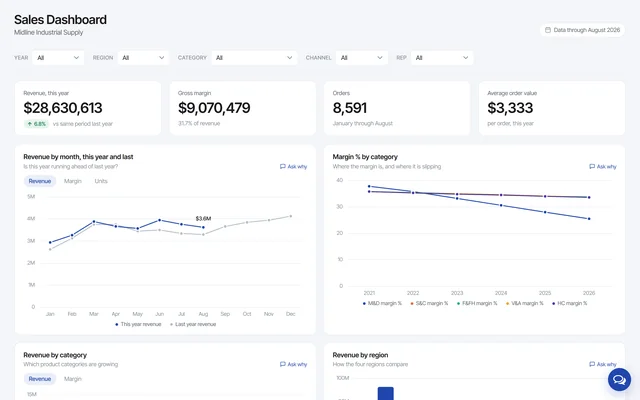
Dashboards are on most IT request lists, and they fail for the same handful of reasons they did ten years ago. Below are the seven I see most, with a fix for each. Where it helps, I’ll point to a live sales dashboard we built this fall for a fictional distributor, so you can see the fix instead of reading about it.
1. Nobody defined what the dashboard is for
Ask the person requesting a dashboard what decision it should help them make. If the answer is “I just want to see everything,” stop there. That dashboard will be built for no one.
Most dashboards do one of three jobs:
Strategic: Executives track progress against company goals. Monthly or quarterly numbers, and only a few of them.
Operational: A department manager watches today’s work. Open orders, late shipments, tickets waiting. The numbers change by the hour.
Analytical: Someone digs into what happened over time and why. Trends, comparisons, drill-down.
“One big mistake is not being clear on what purpose dashboard is serving,” Joe Wang, then CSO at ServicePower, told us. “A dashboard that is good for leadership is typically useless for operations and vice versa. Operational dashboard needs to tell you where the issues are so you don’t waste time looking at everything. You can go straight to the problem. Leadership dashboard rolls up and is typically an average of everything.”
Trouble starts when one dashboard tries to do two of these jobs. Pick one. If the VP wants the strategic view and the sales managers want the operational one, that’s two dashboards, and the second one is usually a filter away (more on that in mistake 5).
2. It shows too much
This is the one I see most. Rather than choose the metrics that matter, the team puts every metric anyone mentioned on one screen. The result is a page that takes ten minutes to read and answers nothing.
“Data Dumping is a common dashboard mistake,” says Jordan Goldmeier, author of Dashboards for Excel. “This is the process of placing everything on a dashboard because you are either unsure of what stakeholders truly want or because you want to make everyone happy. Either way, the result is usually a confusing mess. Dashboards that attempt to be everything to everyone become nothing to anyone.”
Avinash Kaushik’s rule from his Five Rules for High Impact Web Analytics Dashboards still holds: “If your dashboard does not fit on one page, you have a report, not a dashboard.” He adds that the rule “encourages rigorous thought to be applied in selecting the golden dashboard metric” and “acts as a natural barrier to cramming in too much information.”
A practical test: Print it. If it needs more than one sheet, it’s a report. Reports are fine, but they’re a different tool and they belong somewhere else. The sales dashboard above has four numbers across the top and eight charts under them, and each chart carries one caption saying which question it answers (“Where the margin is, and where it is slipping”).
3. Someone has to update the data by hand
A dashboard is only as good as the data behind it. Plenty of dashboards still run on a spreadsheet that someone exports from the ERP on Friday afternoon and pastes into a template. It works for a month. Then that person takes a week off, the export gets skipped, and the VP makes a call on numbers that are three weeks old.
“One common mistake is failing to automate the data feeds,” says Tim Montgomery, founder of TIMIT Solutions and a former CIO. “Do not make the mistake of designing a dashboard dependent on people supplying updates. Out of date data can be worse than no data at all, and people will not keep data up-to-date. Realize that in design phase.”
Stale data is worse than it sounds, because most people don’t question what the dashboard shows them. In TheyDo’s 2025 survey of 1,000 enterprise leaders in the US and Europe, 77% said they rely on dashboards and only sometimes or rarely question the data they receive. If the number on the screen is three weeks old, nobody will catch it.
The fix is to point the dashboard at the database itself. The sales dashboard reads an orders table of about 60,000 rows every time the page loads, and the header says “Data through September 2026” so nobody has to guess how fresh it is. Nobody exports anything.
4. The metrics don’t lead to a decision
Let me ask you a question: What makes a dashboard effective? The charts and the refresh rate matter less than you’d think. An effective dashboard drives a decision. A lot of dashboards are charts on a page, and that’s all they are, because nobody designed them around an action.
“Give it the 5-second test,” says Montgomery. “An executive must be able to ‘feel’ good or bad within 5 seconds of looking at the dashboard. Use Red/Yellow/Green and/or other visual effects to achieve this.”
Before any metric goes on the page, ask what action it will drive. If revenue by rep drops 20% in a quarter, who does what? If nobody can answer, the metric belongs in a report, not on the dashboard.
The sales dashboard’s top row shows revenue for the year with the change against the same period last year right next to it. “Up 6.9%” is something a manager can act on in two seconds. “$32,584,153” on its own tells you nothing.
5. One dashboard for every user
A single dashboard can’t serve everyone. The regional manager in the West doesn’t care about the Northeast. The product manager for Motors & Drives doesn’t want to scroll past Sensors & Controls. So the requests start: “Can you make me one for my region?” “Can you add my product line?”
“I’ve seen too many businesses fall into the customization trap after their dashboard is released,” says Rick Hurckes, Director of Services at mrc. “Every user wants something a little different, which traps the dashboard creator in an endless loop of customizations. One way around this problem is to provide users with customizable dashboards. Give users the option to control which graphs/charts to display on their dashboard as well as the layout. This lets every user customize their own dashboards, and helps you avoid the customization trap.”
Filters do most of this work now. The sales dashboard has a filter bar across the top: Year, region, category, channel and rep. Pick West and 2024, and every number and chart on the page re-queries for that slice. One page, built once, and the West manager and the Motors & Drives product manager each see their own view.
6. Color means nothing
Used well, color is the fastest signal on a dashboard. A red cell says “look here” before anyone reads a number. Used badly, every chart has its own palette and nothing stands out.
“One common mistake found in many organizations’ first iteration of executive dashboards is a misuse of color,” says Douglas Briggs, then Director of Business Intelligence at Washington University in St. Louis. “While color is often one of the most heavily-requested features of a dashboard for its ability to draw visual attention to anomalous data conditions effectively and quickly, organizations often misuse color in dashboards in one or more of two distinct ways.”
Briggs split the problem in two. Overuse: Every chart on the first draft uses color, so “users find it impossible to rely on visual cues.” His fix is to decide the expected range for each metric and use color only for the exceptions. Conflicting meaning: Green for high values works on a sales chart and fails on an out-of-stock chart, where low is good. Pick one rule for the whole page (“green is good, red is bad”) and apply it to what the number means, not to its size.
7. The numbers have no context
Suppose a chart shows a 10% conversion rate. Is that good? Better than last year? Better than the industry? On its own, the number can’t tell you. A dashboard full of numbers with no comparison is a list of facts, and facts alone don’t drive a decision.
Give every important number a comparison. The usual three:
Against a goal. Put the target on the chart. Now the number says how far you have to go.
Against last year. Same period, last year, on the same chart. The sales dashboard shows revenue by month for this year and last on one chart, with “Is this year running ahead of last year?” as the caption, because that’s the question the chart exists to answer.
Against the industry. If a benchmark exists for your metric, show it. A 10% conversion rate reads differently next to an industry figure of 1%.
There’s a fourth kind of context that didn’t exist when this post first ran: The answer to “why.” The sales dashboard puts an “Ask why” link on every chart. Click it under the margin chart and an AI analyst, reading the same orders table, answers with the numbers for each category over the last five years. The chart shows the slide, and the assistant explains it. And because the assistant runs inside the same platform as the dashboard, IT decides which tables it can see.
Where m-Power fits
m-Power is mrc’s low-code development platform. It builds dashboards, reports and AI analysts directly over the databases you already run, on your servers or in your cloud. The live examples in this post come from the sales dashboard on our demos page, which we built in m-Power over that 60,000-row orders table. The filter bar, the charts and the AI analyst are standard m-Power pieces. And because the license has no per-user fees, the dashboard can go to every manager instead of the few people a per-seat BI license covers.
If you have a dashboard on your request list, or one nobody opens, request a demo and we’ll show you how one gets built over your data.
Frequently asked questions
What is the most common business dashboard mistake?
Putting too much on it. Teams that haven’t settled what the dashboard is for add every metric anyone asked about, and the page stops answering any one question. Avinash Kaushik’s test still works: If it doesn’t fit on one page, it’s a report.
How many metrics should a business dashboard show?
As few as the decision needs. A strategic dashboard for an executive often works with a handful of numbers and a few trend charts. If a metric wouldn’t change what anyone does when it moves, leave it off.
What is the difference between a dashboard and a report?
A dashboard monitors. It shows a small set of current numbers against a comparison so someone can act. A report explains. It can run to many pages, include every row, and be read later. Most companies need both, built over the same data.
How often should dashboard data refresh?
As often as the decision changes. An operational dashboard for a warehouse needs today’s orders, and a board dashboard can be monthly. Whatever the interval, the dashboard should read the database directly rather than depend on someone exporting a spreadsheet.
Can AI replace a dashboard?
A dashboard and an AI analyst do different jobs. The dashboard shows what happened faster than any chat can. An AI analyst connected to the same tables answers the follow-up (“why did the West region drop in 2024?”) without anyone building a new report. The combination works when IT controls what data the assistant can see and which model it uses.
Pingback: Three Common Dashboard Mistakes | Option Explicit VBA
Yes, indeed 😀 Offering too much information can be really boring and confusing for a user.
Checkout profiles on b2b portals like IndiaBizClub.com
Dashboards can do a world of good when done right. Never before has so much information been available at just the click of a mouse. Instant data can change how we run our businesses and the speed with which we respond to challenges
Pingback: The Anatomy of the Perfect SaaS Analytics Dashboard - High Tide Advisors
Same dashboard for different users can be very harmful for business.